Back to ConfigMgr main menu
Back to MDM Menu
Previously with ConfigMgr 2012 and Windows Intune it had not been possible to collect the IMEI from mobile devices with regular inventory. This was a real issue for Mobile Device Administrators. The IMEI is crucial information to have when dealing with the device vendors and Telcos.
However, recently, Cory Ferro (Program Manager, Enterprise Client and Mobility - Microsoft) published an excellent workaround which allows you to retrieve the IMEI for Windows Phone 8.1 devices. You can find it here and it really works.
This is an extract from the article:
"Windows Phone 8.1 has added a CSP to allow a GET request for the device’s International Mobile Equipment Identity (IMEI), a unique identifier for a mobile device. Inventory collection of mobile device IMEIs is not enabled by default, however it is possible to retrieve the value of Configuration Service Providers (CSP) nodes through inventory, provided these nodes provide GET operations. The steps provided below show you how to define a new inventory class using MOF (which will use URIs for the nodes/properties of interest), and importing the new class into Configuration Manager. Refer to the Windows Phone 8.1 MDM protocol documentation for information on available CSPs and properties."
The basic steps required are:
1. Create a MOF file from the text published by Cory
2. Save the file xxxx.MOF
3. Import the MOF to ConfigMgr Inventory classes
4. Create and run the query (instructions in Cory's blog). You may have to wait for a short while for the information to populate (a couple of hours for me).
Back to ConfigMgr main menu
My blog has been referenced as recommended reading in the new ConfigMgr 2012 book by Kent Agerlund. Thanks Kent.
System Center 2012 R2 Configuration Manager: Mastering the Fundamentals, 3rd Edition, published by Deployment Artist, can be purchased from Amazon
Back to ConfigMgr main menu
Back to MDM Menu
You can create a Windows Intune trial subscription for 30 days here
Previously, if you wanted to extend this trial you had to enlist the help of your Microsoft account manager and this was a bit of a process. Customers can now do this on their own. You can extend your trial by a further 60 days by calling customer support (you have to extend 30 and a further 30 - not 60 together). You must have global administrator access to your portal to verify your identity.
Edit 24th November 2014
Find your local number for Intune support here
http://technet.microsoft.com/en-US/jj839713.aspx
(((((Find your local CSS telephone number here
http://support.microsoft.com/gp/customer-service-phone-numbers/en-ie )))))
Under special circumstances you may be able to extend past the 90 days but this will not be the norm.
Back to ConfigMgr main menu
Back to MDM Menu
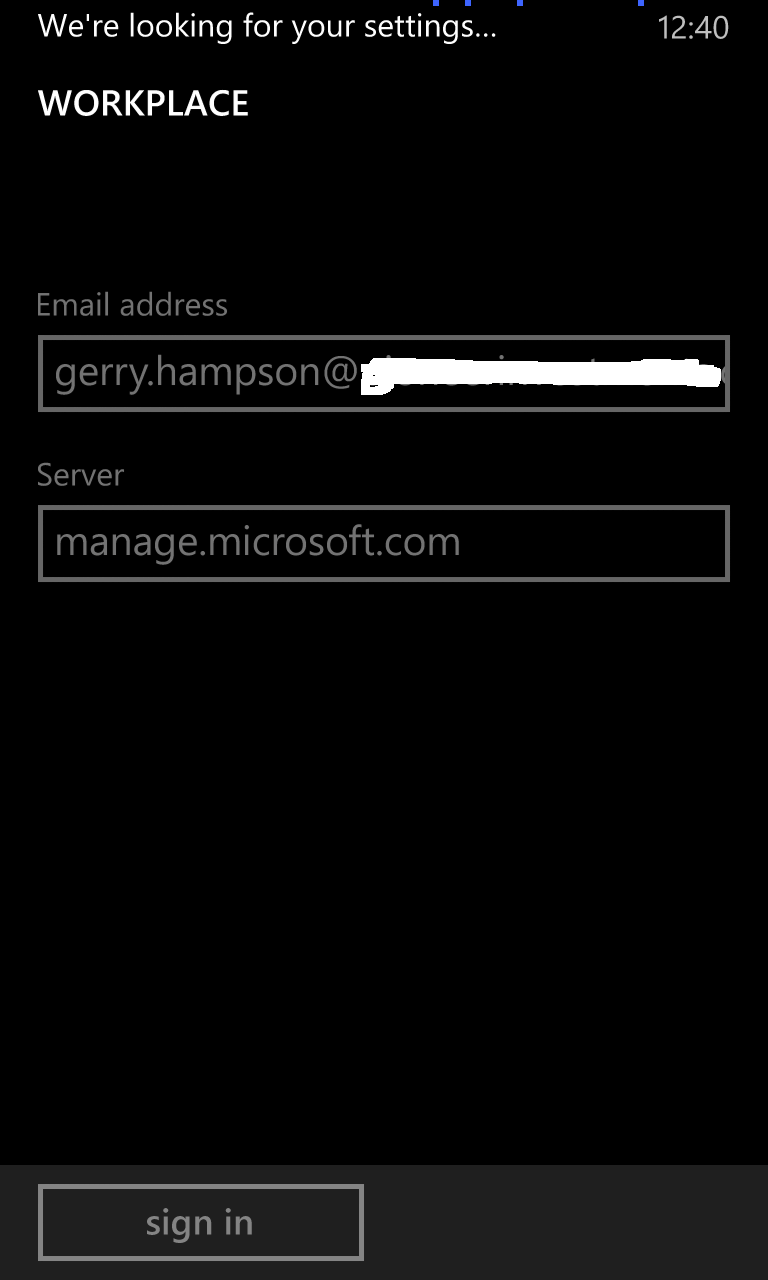
The procedure is exactly the same as for Windows 8 Phone until you are actually enrolling the phone. Instead of Settings > Company Apps you need Settings > Workplace
Windows 8.1 Phone
Navigate to Settings
Open Workplace
Click to Add and account.
Enter your email address as before (or more correctly - your AD account UPN).
Enter the Microsoft server name if required.
Windows 8.1 is connecting to Intune.
The device is enrolled. Install the Company App.
Double-click on the account to see synchronization. Policy is being downloaded.
Synchronization is complete. Compliance policies will soon be applied to the device.
Back to ConfigMgr main menu
Back to MDM Menu
Collection of Windows Phone 8 devices
select SMS_R_System.ResourceId, SMS_R_System.ResourceType, SMS_R_System.Name, SMS_R_System.SMSUniqueIdentifier, SMS_R_System.ResourceDomainORWorkgroup, SMS_R_System.Client from SMS_R_System inner join SMS_G_System_DEVICE_OSINFORMATION on SMS_G_System_DEVICE_OSINFORMATION.ResourceID = SMS_R_System.ResourceId where SMS_G_System_DEVICE_OSINFORMATION.Platform like "Windows Phone" and SMS_G_System_DEVICE_OSINFORMATION.Version like "8.0%"
Collection of Windows Phone 8.1 devices
select SMS_R_System.ResourceId, SMS_R_System.ResourceType, SMS_R_System.Name, SMS_R_System.SMSUniqueIdentifier, SMS_R_System.ResourceDomainORWorkgroup, SMS_R_System.Client from SMS_R_System inner join SMS_G_System_DEVICE_OSINFORMATION on SMS_G_System_DEVICE_OSINFORMATION.ResourceID = SMS_R_System.ResourceId where SMS_G_System_DEVICE_OSINFORMATION.Platform like "Windows Phone" and SMS_G_System_DEVICE_OSINFORMATION.Version like "8.1%"
Collection of Windows RT devices
select SMS_R_System.ResourceId, SMS_R_System.ResourceType, SMS_R_System.Name, SMS_R_System.SMSUniqueIdentifier, SMS_R_System.ResourceDomainORWorkgroup, SMS_R_System.Client from SMS_R_System inner join SMS_G_System_COMPUTER_SYSTEM on SMS_G_System_COMPUTER_SYSTEM.ResourceId = SMS_R_System.ResourceId where SMS_G_System_COMPUTER_SYSTEM.Model like "Surface%"
Collection of iPhones
select SMS_R_SYSTEM.ResourceID,SMS_R_SYSTEM.ResourceType,SMS_R_SYSTEM.Name,
SMS_R_SYSTEM.SMSUniqueIdentifier,SMS_R_SYSTEM.ResourceDomainORWorkgroup,
SMS_R_SYSTEM.Client from SMS_R_System inner join SMS_G_System_DEVICE_COMPUTERSYSTEM on SMS_G_System_DEVICE_COMPUTERSYSTEM.ResourceId = SMS_R_System.ResourceId where SMS_G_System_DEVICE_COMPUTERSYSTEM.DeviceModel like "%iphone%"
Collection of iPads
select SMS_R_SYSTEM.ResourceID,SMS_R_SYSTEM.ResourceType,SMS_R_SYSTEM.Name,
SMS_R_SYSTEM.SMSUniqueIdentifier,SMS_R_SYSTEM.ResourceDomainORWorkgroup,
SMS_R_SYSTEM.Client from SMS_R_System inner join SMS_G_System_DEVICE_COMPUTERSYSTEM on SMS_G_System_DEVICE_COMPUTERSYSTEM.ResourceId = SMS_R_System.ResourceId where SMS_G_System_DEVICE_COMPUTERSYSTEM.DeviceModel like "%ipad%"
Collection of Android devices
select SMS_R_System.ResourceId, SMS_R_System.ResourceType, SMS_R_System.Name, SMS_R_System.SMSUniqueIdentifier, SMS_R_System.ResourceDomainORWorkgroup, SMS_R_System.Client from SMS_R_System inner join SMS_G_System_DEVICE_OSINFORMATION on SMS_G_System_DEVICE_OSINFORMATION.ResourceID = SMS_R_System.ResourceId where SMS_G_System_DEVICE_OSINFORMATION.Platform like "Android%"